Rigid boxes
Drawer box
Greyboard sleeve: strip with three V-grooves, open at both ends, with a joint at the lower front edge.
Opens the online editor with this template. Try it without payment details; export with Pro.
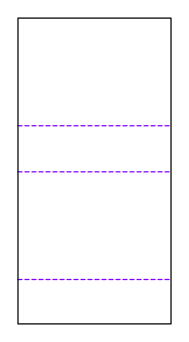
- Template
- Drawer box – sleeve (greyboard)
- Category
- Rigid boxes
- Dimension reference
- Inside dimensions
- Default dimensions
- 153 × 104.6 × 43.1 mm
- Parameters
- 1
- Version
- v1
- Template ID
- rigid.drawer.sleeve
Dimensions and limits
Default dimensions of the template and the permitted range in mm.
| Dimension | Default | Range |
|---|---|---|
| Length | 153 mm | 30–520 mm |
| Width | 104.6 mm | 30–520 mm |
| Height | 43.1 mm | 10–320 mm |
Parameters of this construction
1 parameters with default value and limits, adjustable in the editor.
| Parameter | Default | Range | Note |
|---|---|---|---|
Butt joint gapjointGap | 0.2 mm | 0–1 mm | The walls placed between the long walls are shorter by this value at each joint so they do not bind during erection. |
Components
This construction consists of 4 templates; you open each one separately in the editor.
Assembly
Fold front, back, and underside at the grooves until the underside meets the front. Close the butt joint with adhesive tape, then wrap.
Grain direction
Grain direction of greyboard and wrapping paper parallel to the x-axis of the blank: the long grooves fold cleanly, and board and paper do not warp against each other during wrapping (check with the rigid box manufacturer).
Reference note
No external reference is listed in the catalog.
Labels such as “similar to FEFCO” or “ECMA family, unconfirmed” are for orientation only. The templates are our own constructions; an assignment to a standard code is unconfirmed and not a trademark claim.
Frequently asked questions about this template
Which dimensions does the sleeve table describe?
The sleeve uses 153 mm length, 104.6 mm inside width, and 43.1 mm inside height as starting values. These dimensions are derived from the grayboard tray, starting clearance, and paper. They are not additional product dimensions. When changing the tray interior, the sleeve and both wraps must be recalculated together.
Why is the pull ribbon in two blanks?
The oblong slot lies in the grayboard tray's right end wall. With the pull ribbon enabled, the tray wrap receives a matching oblong slot over this opening. Both parts must use the same setting and pull ribbon width. The starting preview shows the pull ribbon disabled; actual ribbon assembly requires a recalculated variant and an assembly test sample.
How wide can the pull ribbon be?
The ribbonWidth parameter allows 6 to 25 mm and starts at 10 mm. The oblong slot and its bridges must also fit in the end wall. The outline is 2 mm longer than the ribbon width and 3 mm wide; at least a 5 mm bridge remains on each side. The geometric limit may be tighter than the parameter range.
Can I close the sleeve at one end?
This construction has two open ends and a butt joint at the lower front edge. The sleeve wrap turns inward at both ends. A closed end is not provided in this component. Check whether an open sleeve is sufficient for your product and how tray and pull ribbon remain accessible during filling and removal.
Why doesn't a tray that fits by calculation slide reliably yet?
ASM-003 compares dimensions and required clearance. This rule does not determine friction, glue application, paper surface, or assembly variations. Check the wrapped tray in the fully wrapped sleeve, including at the turn-ins. Only a sample made from the target material shows whether sliding and pulling out by the ribbon are suitable for your use.
Related templates
Customise the Drawer box in your browser
Set dimensions and material, review findings and export print-ready as PDF, SVG or DXF.