Rigid boxes
Lid and base box
Greyboard shell for the base of a rigid box: base with four walls, V-grooves, and butt-jointed corners.
Opens the online editor with this template. Try it without payment details; export with Pro.
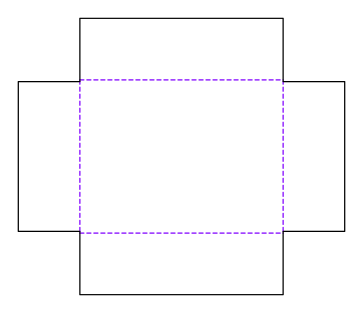
- Template
- Lid and base box – base (greyboard)
- Category
- Rigid boxes
- Dimension reference
- Inside dimensions
- Default dimensions
- 200 × 150 × 60 mm
- Parameters
- 1
- Version
- v1
- Template ID
- rigid.lidbase.base
Dimensions and limits
Default dimensions of the template and the permitted range in mm.
| Dimension | Default | Range |
|---|---|---|
| Length | 200 mm | 30–520 mm |
| Width | 150 mm | 30–520 mm |
| Height | 60 mm | 10–300 mm |
Parameters of this construction
1 parameters with default value and limits, adjustable in the editor.
| Parameter | Default | Range | Note |
|---|---|---|---|
Butt joint gapjointGap | 0.2 mm | 0–1 mm | The walls placed between the long walls are shorter by this value at each joint so they do not bind during erection. |
Components
This construction consists of 4 templates; you open each one separately in the editor.
Assembly
Erect the greyboard at the grooves: front and back walls first, then place the end walls between them. Secure the corners with corner tape, then wrap.
Grain direction
Grain direction of greyboard and wrapping paper parallel to the x-axis of the blank: the long grooves fold cleanly, and board and paper do not warp against each other during wrapping (check with the rigid box manufacturer).
Reference note
No external reference is listed in the catalog.
Labels such as “similar to FEFCO” or “ECMA family, unconfirmed” are for orientation only. The templates are our own constructions; an assignment to a standard code is unconfirmed and not a trademark claim.
Frequently asked questions about this template
Why is the lid larger than the base?
The lid must fit over the already wrapped base. The model adds twice the clearance and four times the paper thickness to the outside dimensions of the base. The inside dimensions of the lid greyboard therefore differ from the product's inside space. If you change the paper or greyboard, recalculate the assembly and confirm the fit on the sample.
Is the lid height the same as the base height?
No. The base starts with an inside height of 60 mm, the lid with 30 mm. ASM-002 warns when lid walls are higher than the base. The lid may then touch the supporting surface. Decide how far the lid should overlap the base with the manufacturer using the wrapped sample.
Why do the wraps have their own dimensions and parameters?
The base wrap and lid wrap enclose different shells. Both use the dimensions of the corresponding greyboard and its thickness as the boardCaliper parameter. Turn-ins and corner flaps change the paper outline. Do not transfer changes by simply scaling: the shell, its wall height, and the wrapping paper thickness limit the possible turn-in.
What is the 0.2 mm joint gap for?
The end walls sit between the long walls. The jointGap parameter shortens them at each joint so the walls do not bind during erection. The default is a construction value that needs checking. Adhesive application, corner tape, and actual greyboard thickness affect the result; confirm the gap on the sample rather than treating it as a manufacturing tolerance.
Related templates
Customise the Lid and base box in your browser
Set dimensions and material, review findings and export print-ready as PDF, SVG or DXF.