Corrugated
Divider insert
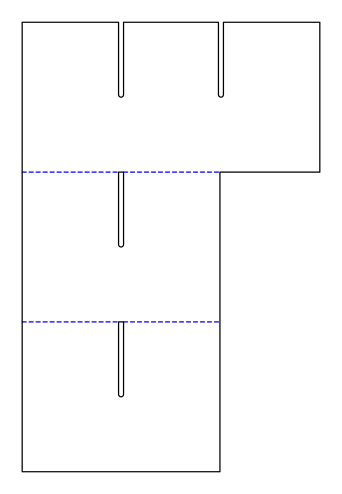
Partition made of longitudinal and cross strips with interlocking slots to half their height, arranged without waste on a sheet and connected by separation lines with nicks; divides a box into length × width cells.
Opens the online editor with this template. Try it without payment details; export with Pro.
- Template
- Divider insert
- Category
- Corrugated
- Dimension reference
- Inside dimensions
- Default dimensions
- 300 × 200 × 150 mm
- Parameters
- 5
- Version
- v1
- Template ID
- corrugated.divider
Dimensions and limits
Default dimensions of the template and the permitted range in mm.
| Dimension | Default | Range |
|---|---|---|
| Length | 300 mm | 50–1,200 mm |
| Width | 200 mm | 50–1,200 mm |
| Height | 150 mm | 20–800 mm |
Parameters of this construction
5 parameters with default value and limits, adjustable in the editor.
| Parameter | Default | Range | Note |
|---|---|---|---|
Cells along the lengthcellsLength | 3 | 2–10 | Number of cells along box length; there is one fewer cross strip. |
Cells along the widthcellsWidth | 2 | 2–10 | Number of cells along box width; there is one fewer longitudinal strip. |
Strip heightstripHeightRatio | 100 % | 30–100 % | Height of the strips as a proportion of box height. |
Strip end clearanceendClearance | 1 mm | 0–5 mm | Clearance between each strip end and the box wall. |
Interlocking slot widthstripSlotWidth | 5 mm | 1–10 mm | Width of the interlocking slots; at least material thickness, and at the die cutter at least the machine's minimum slot width. |
Assembly
Strip the strips at the separation lines. Turn cross strips upside down (slots downward) and insert them over the longitudinal strips until the slot bottoms meet; place the partition in the box.
Grain direction
Flutes vertical in the strips (parallel to strip height): the strips carry loads upright without buckling (check with the test print shop).
Reference note
Reference family described in the catalog; exact classification pending.
Labels such as “similar to FEFCO” or “ECMA family, unconfirmed” are for orientation only. The templates are our own constructions; an assignment to a standard code is unconfirmed and not a trademark claim.
Frequently asked questions about this template
What does three by two cells mean?
cellsLength = 3 divides the box length into three cells; cellsWidth = 2 divides the width into two. This requires two cross strips and one longitudinal strip. The parameters count cells, not strips. Check the clear cell size with the product and actual material thickness.
Why is the dieline taller than the insert?
The dieline shows all strips stacked on a shared sheet. Strip height belongs to each individual strip; sheet height adds them together. After stripping, the strips are slotted together. The sheet's bounding dimensions therefore do not describe the assembled partition and must not be used as box inside dimensions.
Why are cross strips turned upside down?
The interlocking slots extend to half the height. With their slots facing down, cross strips are inserted over the longitudinal strips until the slot bottoms meet. The two directions thus interlock. Check fit at the chosen slot width and fully strip the strips before assembly.
How do the strips stay together during die-cutting?
Separation lines with nicks connect the strips on the shared sheet. The source model uses a starting pattern of 60 mm cut and 0.8 mm web. The production facility must check stripping on the target corrugated board. Nicks assist transport and processing; they do not connect the later assembled partition.
Can I reduce strip height?
stripHeightRatio ranges from 30 to 100 percent of box height; the starting value is 100 percent. A lower insert may suit the product shape but provides no proven retention. Test clear cell height, product contact, and insertion into the box on the assembled sample with the target material.
Related templates
 CorrugatedInsert padcorrugated.insert.pad
 CorrugatedCarry box with hand holecorrugated.handle
 CorrugatedCorrugated sheet with creasescorrugated.sheet
 CorrugatedSlide sleevecorrugated.slide
 CorrugatedSelf-seal shipping boxcorrugated.shipper.selfseal
 CorrugatedMailer with locking tabscorrugated.mailer.lock
Customise the Divider insert in your browser
Set dimensions and material, review findings and export print-ready as PDF, SVG or DXF.