Corrugated
Insert pad
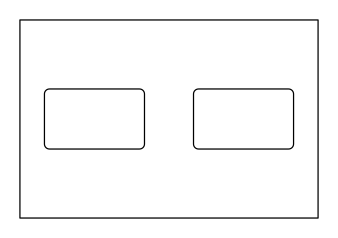
Flat corrugated board pad used as a base, layer, or top pad in a box, optionally with a grid of identical rounded cut-outs; dimensions = inside length × inside width of the box.
Opens the online editor with this template. Try it without payment details; export with Pro.
- Template
- Insert pad
- Category
- Corrugated
- Dimension reference
- Nominal size
- Default dimensions
- 300 × 200 × 0 mm
- Parameters
- 7
- Version
- v1
- Template ID
- corrugated.insert.pad
Dimensions and limits
Default dimensions of the template and the permitted range in mm.
| Dimension | Default | Range |
|---|---|---|
| Width | 300 mm | 30–2,400 mm |
| Height | 200 mm | 30–1,600 mm |
| Corner radius | 0 mm | 0–∞ mm |
Parameters of this construction
7 parameters with default value and limits, adjustable in the editor.
| Parameter | Default | Range | Note |
|---|---|---|---|
Clearance to the case wallpadClearance | 1 mm | 0–5 mm | Clearance between the pad edge and box wall on each side; the pad is smaller than the flat dimensions by twice the clearance. |
Cutoutscutouts | on | on / off | Turn the grid of identical cut-outs in the pad on or off. |
Cutouts acrosscutoutColumns | 2 | 1–10 | Number of cut-outs along the pad width, evenly spaced. |
Cutouts downcutoutRows | 1 | 1–10 | Number of cut-outs along the pad height, evenly spaced. |
Cutout widthcutoutWidth | 100 mm | 10–1,000 mm | Width of each cut-out; at least 10 mm of web remains between cut-outs and at least 5 mm to the edge. |
Cutout heightcutoutHeight | 60 mm | 10–1,000 mm | Height of each cut-out; at least 10 mm of web remains between cut-outs and at least 5 mm to the edge. |
Cutout radiuscutoutRadius | 5 mm | 0–50 mm | Corner radius of the cut-outs; half the shorter side produces an oblong slot or a circle. |
Assembly
Separate the pad from the sheet, remove the cut-outs, and place it flat in the box – as a base, between two layers, or on top under the lid.
Grain direction
Flute direction parallel to the longer side of the pad: greater bending stiffness across the longer span (check with a test print shop).
Reference note
Reference family described in the catalog; exact classification pending.
Labels such as “similar to FEFCO” or “ECMA family, unconfirmed” are for orientation only. The templates are our own constructions; an assignment to a standard code is unconfirmed and not a trademark claim.
Frequently asked questions about this template
Why does 300 × 200 mm produce a smaller pad?
padClearance is subtracted on both sides in each direction. The default value of 1 mm produces a 298 × 198 mm pad from 300 × 200 mm. Here, the flat dimensions refer to the intended inside space of the box. Actual clearance can only be confirmed with the box and intended material.
Are cut-outs enabled by default?
Yes. cutouts is enabled; the starter profile contains two cut-outs side by side in one row. Each cut-out measures 100 × 60 mm with a 5 mm radius. Turn off the grid if you need a solid layer pad. The area metric and cut length then change accordingly.
Can I mix different cut-out sizes?
The template creates a grid of identical cut-outs with a shared width, height, and radius. Different individual outlines are not a parameter of this V1. Columns and rows control the distribution. For a product-specific outline, you need another suitable construction or a separately validated reference dieline.
What limits a dense cut-out grid?
The fitsPitch constraints require enough material between adjacent cut-outs. The model allows for at least 10 mm of web between cut-outs and, with a centered grid, at least 5 mm to the edge. Rounded pad corners may further limit the space. This geometry check does not confirm the mechanical load capacity of the remaining webs.
Is the insert pad creased?
This construction stays flat. It has no crease lines and is inserted as a base, layer, or top pad. If you want to fold an angle or U-profile, check the corrugated sheet with creases. A fold drawn in afterward would not be a documented parameter state of this insert pad.
Related templates
 CorrugatedCarry box with hand holecorrugated.handle
 CorrugatedCorrugated sheet with creasescorrugated.sheet
 CorrugatedSlide sleevecorrugated.slide
 CorrugatedSelf-seal shipping boxcorrugated.shipper.selfseal
 CorrugatedMailer with locking tabscorrugated.mailer.lock
 CorrugatedMailer with closure flapcorrugated.mailer.flap
Customise the Insert pad in your browser
Set dimensions and material, review findings and export print-ready as PDF, SVG or DXF.