Labels
Label sheet
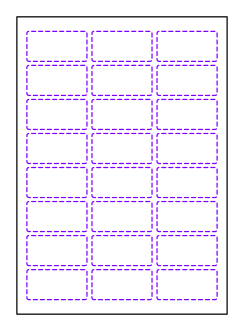
Sheet with multiple identical labels in columns and rows; the labels are kiss-cut, and the liner remains intact.
Opens the online editor with this template. Try it without payment details; export with Pro.
- Template
- Label sheet
- Category
- Labels
- Dimension reference
- Nominal size
- Default dimensions
- 210 × 297 × 5 × 4 mm
- Parameters
- 4
- Version
- v1
- Template ID
- label.sheet.layout
Dimensions and limits
Default dimensions of the template and the permitted range in mm.
| Dimension | Default | Range |
|---|---|---|
| Sheet width | 210 mm | 50–1,000 mm |
| Sheet height | 297 mm | 50–1,000 mm |
| Horizontal gap | 5 mm | 0–50 mm |
| Vertical gap | 4 mm | 0–50 mm |
Parameters of this construction
4 parameters with default value and limits, adjustable in the editor.
| Parameter | Default | Range | Note |
|---|---|---|---|
Label shapelabelShape | rect | rect · round · oval | Shape of the labels on the sheet: rectangle with corner radius, round, or oval. |
Label widthlabelWidth | 60 mm | 10–300 mm | Width of one label (diameter for round labels); all columns, gaps, and margins must fit on the sheet. |
Label heightlabelHeight | 30 mm | 10–300 mm | Height of one label; equal to the width for round labels. All rows, gaps, and margins must fit on the sheet. |
Label corner radiuslabelCornerRadius | 2 mm | 0–50 mm | Corner radius of rectangular labels; at most half the shorter side. |
Assembly
Have the sheet printed and kiss-cut; remove the matrix around the labels and peel each label off the liner.
Grain direction
No fixed grain direction; check parallel to the body axis on curved bodies
Reference note
Reference classification still pending
Labels such as “similar to FEFCO” or “ECMA family, unconfirmed” are for orientation only. The templates are our own constructions; an assignment to a standard code is unconfirmed and not a trademark claim.
Frequently asked questions about this template
Why isn't the liner cut through with the labels?
The sheet's outside edge is a cut outline; the individual labels are kiss-cuts. The export marks these closed lines as score; manufacturing validation recognizes them as kiss-cuts. The manufacturer must coordinate cutting depth and the material combination so that the face stock is cut and the liner is preserved.
Is this automatic imposition optimization?
No. You set rows and columns, gaps, and margins. The construction checks whether the selected labels fit on the sheet. It does not seek an economically optimal arrangement or change the grid automatically. The default example contains 3 × 8, or 24 labels.
Why can a geometrically fitting grid have print findings?
The labels may fit on the sheet while leaving too little space between them for printing to the edge. ART-007 checks the gap against twice the bleed of the production profile. Change gaps, label dimensions, or the grid, then check construction and artwork again.
How do I switch from rectangles to round labels?
Choose labelShape=round and set label height equal to label width. The radius parameter is not used for the round shape. The previous rectangular default dimensions of 60 × 30 mm do not fit the circular shape. Adjust rows, columns, and gaps as needed.
Related templates


Customise the Label sheet in your browser
Set dimensions and material, review findings and export print-ready as PDF, SVG or DXF.