Flat products
CD sleeve
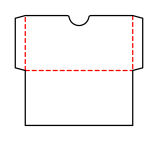
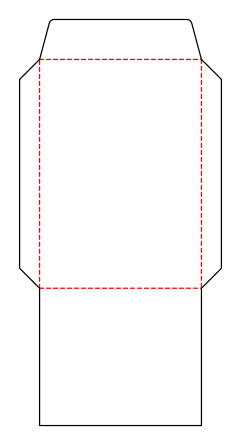
Folding carton with a glue flap and one tuck flap each at the top and bottom; both tuck flaps are attached to the front.
Opens the online editor with this template. Try it without payment details; export with Pro.
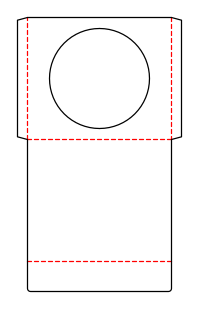
- Template
- CD sleeve
- Category
- Flat products
- Dimension reference
- Nominal size
- Default dimensions
- 120 × 120 × 0 mm
- Parameters
- 10
- Version
- v1
- Template ID
- envelope.cd
Dimensions and limits
Default dimensions of the template and the permitted range in mm.
| Dimension | Default | Range |
|---|---|---|
| Width | 120 mm | 80–200 mm |
| Height | 120 mm | 80–200 mm |
| Corner radius | 0 mm | 0–∞ mm |
Parameters of this construction
10 parameters with default value and limits, adjustable in the editor.
| Parameter | Default | Range | Note |
|---|---|---|---|
ClearancecdClearance | 2 mm | 0–5 mm | Allowance on each side and at the bottom so the disc slides in easily; includes material thickness. |
Glue flapglueFlap | 10 mm | 8–20 mm | Width of the glue flap used to glue the blank into a tube. The material requires a minimum width. |
Glue flap angleglueFlapAngle | 15° | 0–30° | Bevel at the ends of the glue flap; facilitates folding and erection. |
WindowcdWindow | on | on / off | Round window in the center of the front; window film is glued to the film margin on the inside. |
Window diametercdWindowDiameter | 100 mm | 30–140 mm | Window diameter; with the film margin and a 3 mm bridge, it remains beside the side flaps, above the bottom crease, and below the thumb notch. |
Film margincdFilmMargin | 5 mm | 3–10 mm | Width of the glue area for window film around the window. |
Thumb notchcdThumbNotch | off | on / off | Semicircular notch centered at the front opening. |
Thumb notch radiuscdThumbNotchRadius | 12 mm | 5–25 mm | Radius and depth of the thumb notch; no more than 30 % of content width and 40 % of content height. |
Closure flapcdClosureFlap | on | on / off | Flap at the opening of the back that folds over the opening onto the front. |
Flap depthcdClosureFlapDepth | 30 mm | 10–60 mm | Depth of the closure flap; no more than half the content height. |
Assembly
Pre-break the blank along all creases. Glue the glue flap to the inside of the opposite wall and lay the carton flat. Erect for filling, fold in the dust flaps, and insert the tuck flaps.
Grain direction
Grain direction vertical on the blank (check)
Reference note
No external reference classification stated in the catalog.
Labels such as “similar to FEFCO” or “ECMA family, unconfirmed” are for orientation only. The templates are our own constructions; an assignment to a standard code is unconfirmed and not a trademark claim.
Frequently asked questions about this template
Is 120 × 120 mm the CD sleeve's outside size?
No. It is the insert size of the contents. Pocket width also includes clearance and the inside side flaps; pocket height increases by the clearance. The flat blank also contains the back and closure flap. Use the content dimensions and check the finished glued sleeve with the disc.
How is the window attached?
Window film is glued on the inside to the film margin around the round window before the pocket is closed. cdFilmMargin describes this margin. The template calculates the available geometry but specifies neither film material nor adhesive. You must check this combination with the manufacturing shop.
Can the sleeve be built without a window?
Yes. cdWindow turns the window on or off. Without a window, the round opening in the front is omitted. The stored window diameter then has no effect on the cut. Check the preview and new production sheet when switching between a solid front and a window sleeve.
Why is a larger window not always permitted?
The window, including film margin and a 3 mm bridge, must fit beside the side flaps and between the bottom crease and opening. A thumb notch further reduces the available space. The parameter range alone is therefore insufficient: the specific content dimensions and enabled options determine the permitted combination.
Are the thumb notch and closure flap independent?
Yes. cdThumbNotch controls the removal opening in the front; cdClosureFlap controls the flap on the back. In the starting example, the notch is off and the flap is on. When enabling the notch, pay particular attention to the distance to the window and test removal before placing artwork in these areas.
Related templates
Customise the CD sleeve in your browser
Set dimensions and material, review findings and export print-ready as PDF, SVG or DXF.