Flat products
Presentation folder with pocket
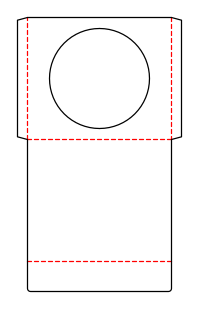
Folding carton with a glue flap and one tuck flap each at the top and bottom; both tuck flaps are attached to the front.
Opens the online editor with this template. Try it without payment details; export with Pro.
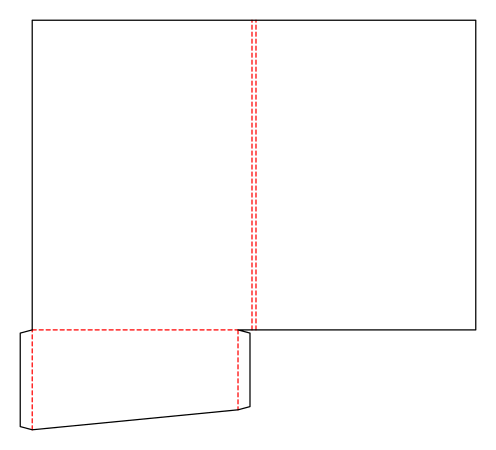
- Template
- Presentation folder with pocket
- Category
- Flat products
- Dimension reference
- Nominal size
- Default dimensions
- 220 × 310 × 0 mm
- Parameters
- 6
- Version
- v1
- Template ID
- folder.pocket
Dimensions and limits
Default dimensions of the template and the permitted range in mm.
| Dimension | Default | Range |
|---|---|---|
| Width | 220 mm | 120–330 mm |
| Height | 310 mm | 150–450 mm |
| Corner radius | 0 mm | 0–∞ mm |
Parameters of this construction
6 parameters with default value and limits, adjustable in the editor.
| Parameter | Default | Range | Note |
|---|---|---|---|
Spine widthfolderSpine | 4 mm | 0–20 mm | Distance between the two spine creases and thus the folder's filling depth; 0 creates a simple fold. |
PocketsfolderPockets | right | right · left · both | Pocket positions in the open folder: right (on the back cover), left (on the front cover), or both sides. |
Pocket heightfolderPocketDepth | 100 mm | 40–160 mm | Pocket height at the outside edge from the pocket crease; no more than half the folder height. |
Pocket slantfolderPocketSlant | 20 mm | 0–60 mm | The amount by which the pocket is lower at the spine than at the outside edge (sloping pocket edge); no more than half the pocket height. |
Glue flapglueFlap | 12 mm | 8–20 mm | Width of the glue flap used to glue the blank into a tube. The material requires a minimum width. |
Business card slitsfolderCardSlits | off | on / off | Four corner slots for an 85 × 55 mm business card on the right pocket; the pocket must be at least 75 mm high at the spine. |
Assembly
Pre-break the blank along all creases. Glue the glue flap to the inside of the opposite wall and lay the carton flat. Erect for filling, fold in the dust flaps, and insert the tuck flaps.
Grain direction
Grain direction vertical on the blank (check)
Reference note
No external reference classification stated in the catalog.
Labels such as “similar to FEFCO” or “ECMA family, unconfirmed” are for orientation only. The templates are our own constructions; an assignment to a standard code is unconfirmed and not a trademark claim.
Frequently asked questions about this template
Does 220 × 310 mm describe the open folder?
No. It is the finished size of the closed folder. Front and back covers, spine, and pocket together form a larger blank. In the starting example it is 456 × 410 mm. Plan the design using individual cover and pocket panels instead of treating the closed size as the entire sheet.
Can the pocket be on the left or both sides?
Yes. folderPockets offers right, left, and both. Right means on the back cover of the open folder, left on the front cover. Both pockets have their own glue flaps. The selection changes blank and assembly. After switching, also check artwork assignment and room for the inserted contents.
What happens with zero spine width?
folderSpine set to 0 produces a simple center crease instead of a spine with two creases. This is another construction within the same folder ID. It does not yet show whether your documents have sufficient room. Check the filled folder and choose the spine to suit the actual contents.
Where are the business card slots?
The folderCardSlits option creates four corner slots for an 85 × 55 mm card on the right pocket. This pocket must be at least 75 mm high at the spine. A left-only pocket does not meet this prerequisite. Check pocket height, slope, and selection together before assembly.
How does the pocket slope work?
folderPocketSlant reduces pocket height at the spine relative to the outside edge. This creates a sloping top pocket edge. The parameter is tied to pocket height. With business card slots, sufficient area must remain despite the slope. Check this with documents and card inserted because both affect use.
Related templates
Customise the Presentation folder with pocket in your browser
Set dimensions and material, review findings and export print-ready as PDF, SVG or DXF.