Flat products
Header card
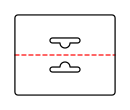
Folding carton with a glue flap and one tuck flap each at the top and bottom; both tuck flaps are attached to the front.
Opens the online editor with this template. Try it without payment details; export with Pro.
- Template
- Header card
- Category
- Flat products
- Dimension reference
- Nominal size
- Default dimensions
- 100 × 40 × 0 mm
- Parameters
- 6
- Version
- v1
- Template ID
- card.header
Dimensions and limits
Default dimensions of the template and the permitted range in mm.
| Dimension | Default | Range |
|---|---|---|
| Width | 100 mm | 40–300 mm |
| Height | 40 mm | 15–150 mm |
| Corner radius | 0 mm | 0–∞ mm |
Parameters of this construction
6 parameters with default value and limits, adjustable in the editor.
| Parameter | Default | Range | Note |
|---|---|---|---|
Hang holehangHole | euro | euro · round · slot | Hole for hanging on a retail shelf: Euro slot (elongated slot with a round hole above), round hole, or slot. On cartons and the gift card holder, it is centered in a header above the top edge. |
Hole widthhangHoleWidth | 30 mm | 10–60 mm | Width of the elongated slot in the Euro slot and slot options. |
Slot heighthangHoleHeight | 5 mm | 2–10 mm | Height of the elongated slot in the Euro slot and slot options; the ends are semicircular. |
Hole diameterhangHoleDiameter | 10 mm | 3–20 mm | Diameter of the round hole or circle above the elongated slot in the Euro slot; larger than slot height for the Euro slot. |
Hole distanceheaderHoleDistance | 12 mm | 4–100 mm | Distance from the hole center to the fold; at least a 3 mm bridge remains to the fold and bottom edge. |
Corner radiusheaderCornerRadius | 3 mm | 0–10 mm | Radius of the free bottom corners on the front and back. |
Assembly
Pre-break the blank along all creases. Glue the glue flap to the inside of the opposite wall and lay the carton flat. Erect for filling, fold in the dust flaps, and insert the tuck flaps.
Grain direction
Grain direction horizontal on the blank (check)
Reference note
No external reference classification stated in the catalog.
Labels such as “similar to FEFCO” or “ECMA family, unconfirmed” are for orientation only. The templates are our own constructions; an assignment to a standard code is unconfirmed and not a trademark claim.
Frequently asked questions about this template
How large is the card before folding?
The input describes the folded final format. In the starting example, this is 100 × 40 mm; the open blank is 100 × 80 mm. The center crease connects both layers. Place front and back content using these panels so text reads in the correct direction after folding.
Why does the dieline contain two hanging holes?
The header card consists of two layers. The second layer's hole contour is mirrored across the center crease. After folding, both openings should align exactly. Do not simply cut one hole out of the finished front; the calculated construction accounts for both layers before folding.
Which hole shapes can I set?
hangHole offers Euro slot, round hole, and slot. Hole width and slot height apply to elongated slot shapes; diameter applies to the round hole and circular part of the Euro slot. Check the applicable parameters and resulting bridge when changing shape. The starting example uses the Euro slot.
What does a hole distance of 12 mm mean?
headerHoleDistance is the distance from the hole center to the center crease. The free material bridge also depends on the entire hole shape. The layout requires clearance from the crease and bottom edge. A larger hole can therefore leave too little bridge despite an unchanged center point.
Does the template calculate attachment to the bag?
The assembly description calls for stapling or gluing over the bag edge. The template creates the header card with crease and holes, but no attachment system with guaranteed load capacity. Test bag material, attachment, and hole bridge together on the physical sample and agree on processing with your production partner.
Related templates
 Flat productsGift card holdercard.giftholder
 Flat productsCard sleevecard.sleeve
 Flat productsPresentation folder with pocketfolder.pocket
 Flat productsEnvelope with side flapsenvelope.pocket
 Bags and pouchesCarrier bag with gussetsbag.carrier
- custom.polygonCustom shapeCustom shape with creasescustom.polygon
Customise the Header card in your browser
Set dimensions and material, review findings and export print-ready as PDF, SVG or DXF.